Categories
General

David, moments after his first bath


David, moments after his first bath, originally uploaded by Yzukerman.

I am now a father of two.
I really have a family. It is amazing. I look in the mirror and I see something different. Maybe it is me being exhausted, maybe I look eerily like my father now. Yet the joy is tremendous.

Yes. You forget just how intense and demanding newborns are, but while we are tired, tattered, a bit on edge, I am profoundly happy. The love and warmth that Ari gives us is amazing. The conversations, the thoughts he shares with us are both amusing and eye opening. Now he is a brother (and a good one!).

Celebrating tomorrow.

Share
Categories
Computing Web Development

Weird Firefox 3 Issue

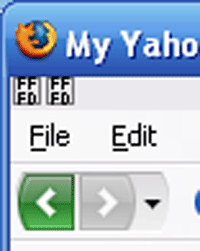
So I succumbed to the urge an installed Firefox 3 on my home machine. Most extensions are there now, except for my beloved TinyURL Creator, so things are pretty cool. That, except for the weird icon that I have appearing above the File menu (and cannot appear to be removed) that looks like this:

firefox-3-weird

What is FF FD? Any ideas?!

UPDATE:

I believe I have a solution to the issue. One of my add-ons/extensions was apparently not compatible with Firefox 3 (and I *did* tinker with it being a bit of a hopeful thinker – ‘How bad can it be?’) or that have a conflict with other extensions (sounds very Mac OS 9…). In any case, if this happens to you, the procedure to detect the offending extension is pretty simple:

  1. Go to the ‘Tools’ menu and select ‘Add-ons’.
  2. Click the ‘Extensions’ button which will list all available extensions.
  3. One by one, disable all of them. Extensions should have a ‘Disable’ button available when you click them in the extension list. Although you will be prompted to restart Firefox after you disable the first one, you can disable all of them and only then restart.
  4. Restart Firefox. It will most like take a bit of time, but it will start and I will be that you will not see the pesky FF FD icons anymore.
  5. Now, one by one, or two by two (whatever) re-enable the extensions. You will eventually get the FF FD back there, but by this method of deduction you will get to know precisely which is the offending extension (the last one you enabled!).

Hope this is of help.

Share
Categories
Java Web Development

Using Velocity date tool with Spring MVC

I was having trouble getting Velocity‘s date tool to work with Spring MVC. I followed the instructions, most copied verbatim from what was most likely one ancient source. Those instructions said that to enable Velocity’s date formatting tool, DateTool, I needed to configure the VelocityViewResolver like this (WRONG):

<bean id="viewResolver">
  class="org.springframework.web.servlet.view.velocity.VelocityViewResolver"></bean>
<br /><property name="numberToolAttribute"><value>numbertool</value></property>
<br /><property name="dateToolAttribute"><value>datetool</value></property>
&nbsp;

And then use it as:

$date.format("yyyy-MM-dd", $currentDate)

This would have been cool had I seen it in just one source but more than one source had it. The problem is small but crucial:

The value you give the dateToolAttribute property will be the name of the object Velocity will try to access when you are using the tool. So in the above configuration, the value for dateToolAttribute is “dateTool”, and hence the usage should be:

$dateTool.format(“yyyy-MM-dd”, $currentDate)

It may sound petty but it took me time to discover… lame.

Share
Share