Categories
Computing Mac OS X

OS X printer setup bug: No IPP over HTTP

I have an old-ish US Robotics (!) wireless router which while not spectacular like many Linux-ed has one truly nifty trick up its sleeve – a USB print server. It allows you to plug in virtually any non-network-enabled printer and share it among whoever is connected to your wired or wireless network.

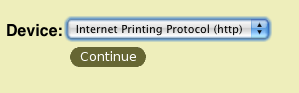
Today I tried to set it up to work with my Mac. The router is old enough to show OS X 10.3 (I think) support information on how to connect the Mac to a printer attached to its print server. I am on OS X 10.5 and there was one thing that was pretty darn off:
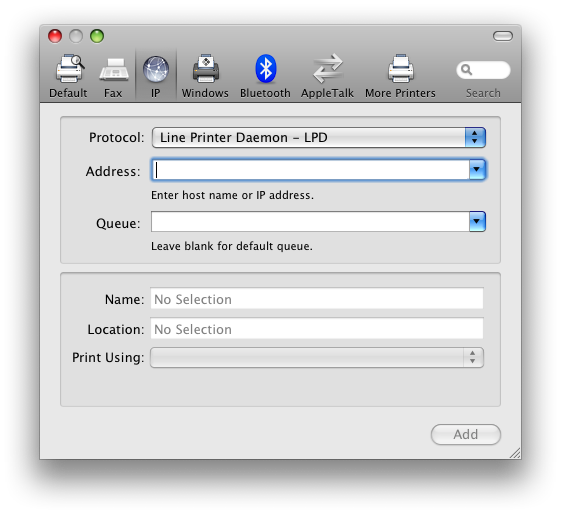
On OS X 10.5 your choices are more limited than on that older version in that photo. The add printer dialog box offers you three options for network connections: IPP, or Internet Printing Protocol – which is used by my router, LPD – a UNIX network printing protocol, and HP JetDirect, HP’s proprietary printing protocol.
Still, my printer would not work and after a while I found out why. The router’s network print server uses a URL such as
http://192.168.2.1:1631/Printers/My_Printer
The add printer dialog only allows you to add a printer by specifying its IP address and port, as well as its queue name. What it does not allow you to specify is what *protocol* to use when using IPP. The result URLs stemming from the dialog look close to the one I needed, but not right:
ipp://192.168.2.1:1631/Printers/My_Printer
If you notice, the URL is now with an ipp protocol prefix. And that does not work because it is simply the wrong protocol. There is literally no way to make this happen, through the ‘conventional’ means offered by OS X – this add printer dialog. I doubt that this is too big of an issue for too many people, but the fact that it used to work in previous versions of the operating system is a bit sad. So how do you still make it work?

A few years ago, Apple took over one of the biggest undertakings of the open source community – making printing on UNIX and Linux suck less. The CUPS project actually achieved that goal and its print server is built into every OS X machine. CUPS, like on any UNIX machine, can handle virtually any common printer on any protocol – part of the beauty of open source. And on OS X you can access its administrative screens (a bit rough but very usable) by going to the URL
http://localhost:631
Once there, you can follow CUPS’ web-based wizard to add a new printer and lo and behold – it offers a network print protocol option of (drumroll), of Internet Printing Protocol over HTTP. Make sure you have your password for the machine to actually complete the printer but once it is added, it appears in the normal, OS X printing screens.

In short – it appears to be an OS X bug or omission, but luckily not something beyond the realm of accomplishing.

Share
Categories
Computing

Microsoft Office 2008 for Mac: Experiences and Incompatibilities

I am generally happy with Microsoft Office 2008 for the Mac. Things work pretty well – Word docs interoperate with Windows versions seamlessly ; Excel works almost perfectly with complex documents too. Entourage is faster, in general than Outlook, not a big achievement. But shortcomings do rear their ugly heads.

I would highly recommend avoiding the use the old Word format (.doc) with large documents and sticking with .docx (the modern extension). While working on my thesis, I was suddenly told there was no space on my hard drive when trying to save the .doc. Saving as .docx worked fine. I sweat bullets getting to that conclusion with no real support from Microsoft’s online documentation. This may have been addressed in the patches Microsoft issues regularly.

With Entourage, I was unable to find a way to get my notes – the Post-It looking things – which I use on my Blackberry for temporary information. Entourage also cannot invite people as optional. It can do great things Outlook cannot do, such as grouping contacts and emails into Projects. That’s neat but not fundamental.

Finally, today I encountered a big issue with PowerPoint 2008: On the PC, when saving a presentation you have the option to embed the fonts you used (assuming they have no copyright restrictions) with your file – to ensure optimal viewing or editing. The Mac version does not even offer that option and DOES NOT save the fonts for you – almost guaranteeing issues. Somewhat of a dealbreaker for me.

All in all, though, the layout of the applications is much less revolutionary (read Office 2007 for PC) and drastically more useful. There is some hint of the Office 2007 ribbons, but without the nonsense, hidden commands and extensive headaches. The applications also appear generally much more stable than their PC counterparts and run faster. Microsoft gets a solid 8 for this effort, as long as you are aware of the limitations and constraints.

Share
Categories
Computing General

Share Online: Why Nokia has it wrong. Again.

Being surrounded by oceans of happy, gloating, iPhone users is not an easy thing, especially in America. Having invested a very large amount of money in my Nokia N95-8GB means that I need to come up with angles to justify that decision. The best one I could think of is this: there is no other phone that could provide the ability to generate content and record life in image and video better than the N95.

The key enabler for this ability is a piece of software from Nokia called ‘Share Online‘. In essence it allows you to upload photos and videos to Flickr, or Nokia’s Ovi server or to any other service out there that offers a simple XML file with definitions. It is a great application that turns the phone into a veritable news agency. It has a few kinks, specifically the inability to upload more than 6 files at a time or schedule an upload when one is taking place.

I have seen several updates from Nokia discussing a new version of this wonderful application but oddly enough my phone, still among the strongest out there, was not on the list of supported devices. More digging around brought me to this message on the application’s discussion board, originating from a person on Nokia’s development team:

Hi MKR10001 and speedgrapher,

Unfortunately, the designers of Share Online took a dependency upon a feature of S60 v3 fp2 back in
version 3.1 of Share Online, and this has meant that no subsequent version can run on v3 fp1 devices.

So, I am sorry to tell you, that Share Online 4.3 will not be available for fp1 devices.

I appologize on behalf of Nokia. In the future, we are going to make a greater effort to make more thoughtful architectural decisions so that we don’t automatically exclude existing customers this way.

Thanks,
Larry
PM, Ovi Share Clients
Nokia US

For the uninitiated, the N95 runs Nokia’s Symbian Series 60 operating system version 3, with feature pack 1, or ‘fp1’. If you did not get it so far, like the multitude of N95 users, we are virtually screwed. While on a single application, in this marketplace where Nokia is under virtual siege at the smartphone level, do they really want to alienate its dedicated clients? Apparently, they do not care enough. Let’s move the next piece of plastic instead of enhance the experience on this really expensive phone you bought.

Really not great.

Share
Share